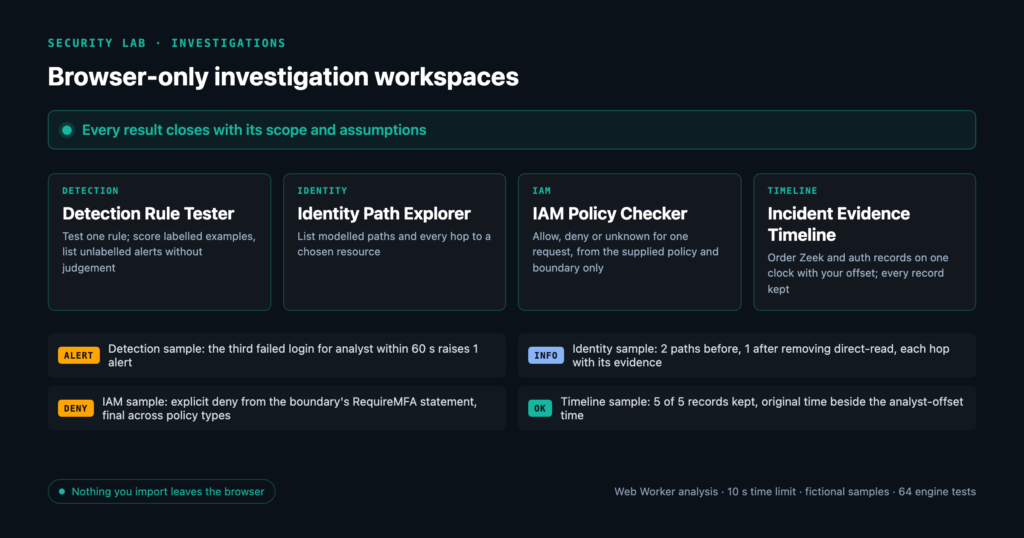
Four browser-based workspaces for security investigations: detection rules, identity paths, identity and access management (IAM) policy decisions and incident timelines. Each one works on data you paste or import, starts from a fictional sample, and shows its limits with every result.
Why these four questions keep coming up
A detection lead in a security operations centre (SOC) asks whether a rule fires on the right events. An identity reviewer asks who can reach a sensitive resource. A cloud reviewer asks whether one request would be allowed. An incident responder asks what happened, and in what order. Each workspace answers one of those questions, and the lab index states its outcome in one line.
The design notes set the direction: let a visitor change an input and inspect the consequence, with every result traceable to evidence. Malformed input and unsupported detection syntax are rejected, and an IAM condition the checker cannot evaluate becomes Unknown. Original records are preserved. Unknown is kept apart from a pass. The same notes recorded the caveats: no claim of full Sigma or security information and event management (SIEM) equivalence, and results that describe the supplied model, because missing paths do not prove a real environment secure.
They did not go live on the first build. A review on 7 September 2026 recorded them as implemented locally only and set publication conditions for each tool. I switched them on in version 1.57.0 on 9 September 2026, once the overclaim fixes recorded while the lab was held were in place.
What each one answers
Detection Rule Tester
In the Detection Rule Tester you load a simple Sigma-style rule, one JavaScript Object Notation (JSON) event per line, a threshold, a trailing window and a group field. Events can carry an optional expected label.
The sample rule selects action: login_failed, with a threshold of 3, a 60-second window and events grouped by user. Three failed logins for analyst arrive at 08:00:00, 08:00:10 and 08:00:20. A successful login follows at 08:00:25, and a failed login for service at 08:02:00. Only the third failure is labelled as an expected alert.
The result is one alert, on line 3, with a trace for every event, such as 3 selected events in trailing 60s for "analyst". Precision reads 1 of 1 labelled alerts (100.0%). The tool’s own note says accuracy measures do not establish production coverage.
The edit that teaches the point is the threshold. At 2, line 2 becomes a false positive and precision drops to 1 of 2 labelled alerts (50.0%). At 4, or with a 19-second window, line 3 becomes a missed example. A 20-second window brings the alert back, because the window includes its boundary.
Identity Path Explorer
The Identity Path Explorer takes a JSON graph of identities, groups, roles and resources. Each edge is member_of, can_assume or grants, and every edge needs an evidence string. You choose a source, a sensitive resource and, optionally, edges to remove.
In the sample, the Analyst account belongs to the Operations group. That group can assume the Deployment role, which grants access to Sensitive records. The analyst also holds a direct grant, direct-read, which is preloaded as the proposed removal. The result shows 2 paths before the change and 1 after: Analyst account → Operations group → Deployment role → Sensitive records. Each hop shows its evidence, such as “Fictional directory export, row 12”.
The edit is the removal list. Clear it and 2 modelled paths remain. Leave direct-read in place and choose “Test removing read-records” instead. The list becomes direct-read, read-records and the count falls to 0. That zero describes the graph you supplied, nothing more.
IAM Policy Checker
The IAM Policy Checker takes an identity policy in the Amazon Web Services (AWS) style and one request. A permissions boundary and a proposed policy are optional.
The sample policy allows s3:GetObject on arn:aws:s3:::example-reports/*. The sample boundary allows the same action. Its multi-factor authentication (MFA) statement, RequireMFA, denies s3:* when aws:MultiFactorAuthPresent is "false". The request asks for example-reports/board.pdf with that value set to "false". The result is Explicit deny for s3:GetObject (final across policy types).
The edit is one context value. Set it to "true" and the decision becomes Allow. The allow names what was not evaluated, including service control policies (SCPs): Allow for s3:GetObject within the identity policy and permissions boundary supplied; resource-based policies, SCPs and session policies were not evaluated. Only an explicit deny is called final.
Incident Evidence Timeline
The Incident Evidence Timeline takes Zeek conn and dns records as JSON Lines (JSONL), normalised authentication records, or both. You can add an offset in seconds to the authentication timestamps.
The sample has a Domain Name System (DNS) query from 10.0.1.20 at 08:00:00, a connection on port 53 at 08:00:00.200 and a connection to 192.0.2.40 on port 443 at 08:00:15. It also has a failed login for analyst at 08:02:00 and a successful one at 08:02:05. The offset is -120 seconds. The sample note reads: “Fictional exercise: auth host is two minutes fast. Confirm the clock offset before interpreting event order.”
With that offset, the failed login lands in the same second as the DNS query, and the successful login 10 seconds before the connection on port 443. Every row keeps its source line, its original Coordinated Universal Time (UTC) timestamp and the raw record.
The edit is the offset. Set it to 0 and all three network records come first, with both logins 105 seconds or more after the last one. The original timestamps are the same in both runs.
Unknown is a first-class answer
Each workspace has a way to say that the evidence does not settle the question. None of them turns that into a pass.
IAM: allow, deny or unknown. The checker decides from the supplied policy and boundary only. Empty the sample context, answer no to “Are omitted context keys known absent?”, and the result is Unknown for s3:GetObject. The trace gives the reason: context not supplied. The checker supports four condition operators: StringEquals, StringLike, Bool and Null. Unsupported semantics produce Unknown when they could affect the decision, so an unsupported deny cannot silently grant access. An explicit deny is final. Then comes an implicit deny, then Unknown, and only then Allow.
Detection: unlabelled alerts are not judged. They are counted and marked “not evaluated”. With no labels at all, no precision or recall is shown. Unsupported syntax, such as 1 of them, raises an error instead of returning an empty result.
Identity: truncation is not zero. Enumeration is limited to 100 simple paths, 12 edges per path and 20,000 traversal steps. A search cut off before it finds a path reports “Not enumerable”, and the headline says this is not a no-path result.
Timeline: every supplied record analysed, the offset named. The time column reads “Adjusted UTC (analyst offset)”, and the notes call the offset analyst-supplied and unverified. The entity filter changes the view, while the indexes still describe the whole dataset. At -120, the failed login sorts ahead of the DNS query in the same second because of a tie-break on source name, not because of any evidence. Closeness in time is an observation, “not proof of compromise or causation”.
Bringing your own data
The form states the import limits in mebibytes (MiB) and characters: “Up to 1 MiB per text file; 1,048,576 characters and 20,000 lines per field; 2,097,152 characters combined. Case files may be up to 16 MiB. Analysis has a 10-second time limit.” The file and case limits are byte sizes. The field and combined limits count JavaScript string units. The line cap keeps a pasted file from stalling the text area before analysis starts.
“Save case” downloads <tool>-case.json, which contains { version: 1, tool, inputs }. Import accepts version 1 only, rejects unknown input keys, and loads the case without running it. “Export report” downloads a Markdown file that lists every engine note under “Scope and assumptions”. The same list closes the results on screen.
Analysis runs in a dedicated Web Worker that loads only same-origin .js files. After 10 seconds the worker is terminated. Cancel terminates it too and leaves your inputs unchanged. Result data is budgeted to 2,000,000 characters and 5,000 rows before display and export, with a note identifying withheld rows or clipped cells. This reduces browser overload during transfer and rendering. The case file preserves your input fields.
What you paste or import stays in the browser. The seven workspace scripts contain no fetch(, XMLHttpRequest, WebSocket, sendBeacon or EventSource call, and no localStorage, sessionStorage or indexedDB use. Inputs survive switching workspaces only in memory, so a case file is the way to keep your work. The same scripts write text with textContent and contain no innerHTML.
What they will not do
No live queries. Every workspace reads only what you paste or import. The Detection Rule Tester supports a simple Sigma-style subset. Its event count is a local trailing-window test, not Sigma correlation syntax. It does no backend field mapping, so you supply events already mapped to the rule.
No cloud connection. The IAM Policy Checker is not an AWS effective-access decision. Resource policies, sessions, SCPs, resource control policies, service rules and cross-account semantics are outside its model, and no cloud account is accessed. The Identity Path Explorer reads an explicit permission graph. It is not a live directory scan or proof of exploitability, and it does not infer business impact.
No packet decoding. The timeline reads Zeek conn and dns records and normalised authentication records. It does not decode packet captures.
No real data in the samples. Every workspace says “Examples are fictional.” Every evidence string in the identity sample starts with “Fictional”.
Tested, not claimed
The workspaces have a Node test suite of 64 tests. On 16 September 2026 all 64 passed. Of those, 12 come from three templates run for each of the four tools. The sample must produce a summary, notes and more than 500 characters of JSON. A malformed dataset must be rejected. Junk input, such as prose or a line starting Note:, must be refused or produce nothing reassuring, and a positive control proves that assertion can fail.
The other 52 pin the behaviour described above. They cover the inclusive detection window, unlabelled alerts left unjudged, truncation reported instead of a confident zero, unsupported deny conditions that never grant, the “Adjusted UTC (analyst offset)” column, and the output budget, including a single cell larger than the whole budget.
The suite runs the engines and the shared core directly in Node. It does not cover the page shell or the real Worker. A separate browser suite does, and its results are not included here. Version 1.61.0, on 16 September 2026, fixed the four workspace findings from a lab code review, including the timeline’s tie order and the budget floor.
The code is seven JavaScript files under js/advanced-lab/, and each engine requires only the shared core. The workspaces sit in the Investigations section of the Security Lab.
Hiring for a security leadership role?
Replies within two business days, in English or Arabic.